How I manage teams of coding agents on a private project locally
Written by Bob, my BusyYaks agent · open source. Thanks, Bob :)If you follow Anthropic releases, you may know that a new, still-beta feature was released: Claude Code agent teams (experimental, CLAUDE_CODE_EXPERIMENTAL_AGENT_TEAMS=1). One session is the team lead and spawns teammates, each a separate Claude Code instance with its own context window. They share a task list — claims are guarded by file locks — and message each other directly; you can talk to any teammate yourself. Teammates run inside the lead’s terminal or in tmux / iTerm2 split panes, and the TeammateIdle, TaskCreated and TaskCompleted hooks can hold them to a quality gate.
The documented limits shape how I use it: one team per session, no nested teams, /resume doesn’t bring in-process teammates back, and claude -p never spawns teammates — so my headless daily report (below) stays on plain subagents.
| my kanban | agent teams | |
|---|---|---|
| Unit | a whole session per team, per repo | teammates inside one session |
| Work list | board in SQLite, survives every session | task list per team, under ~/.claude/tasks/ |
| Who talks to whom | me ↔ owner session, via card comments | teammate ↔ teammate, lead ↔ teammate |
| Human gate | Human Check → Ready to merge on my approval | permission prompts surface in the lead |
| Crash | watchdog frees the card after 60 s | resume does not bring teammates back |
The two layer rather than compete: my kanban decides which session owns which card, and inside that session the lead can run a team — or plain subagents — on it. Here is how my side works.
On a private project I run several Claude Code sessions at once, each with its own subagents. They share one board. I read the board, answer questions on cards, and merge. Everything below runs on a kanban I vibe-coded for my own needs — a Hanami JSON API, a React SPA, SQLite and an MCP server for the agents. It is not a product; it does what my projects need and nothing else.
It barely took any of my time. I never sat down to build it. It grew as I moved tasks onto it: each time more of my process moved to the board, I found something it was missing, and Claude Code added it. A comment had to reach the agent, so it got pings. A session died and left a card stuck, so it got a watchdog. Agents skipped my review, so it got a Human Check column only I can clear. There is no build time to quote for a kanban like this. It is how my development process changed, written down as code.
That was also why I didn’t open-source it at first. Everyone shapes their process differently, and mine fit only mine. Yours may still be better grown the same way, from your own needs.
Well, it may still not work well for complicated tasks that really need developer input, but it can solve a lot of small issues for sure.
The process behind it — tickets, gates that never write code, a preview per ticket, a human who merges — is the one from Engineering 3.0: scaling a non-technical team on agents. This is the board that runs it with agents.
The screenshots use a mock project (acme/forecast-web, forecast.example) with made-up cards, branches, PRs and sessions. The UI is the real one.
The board
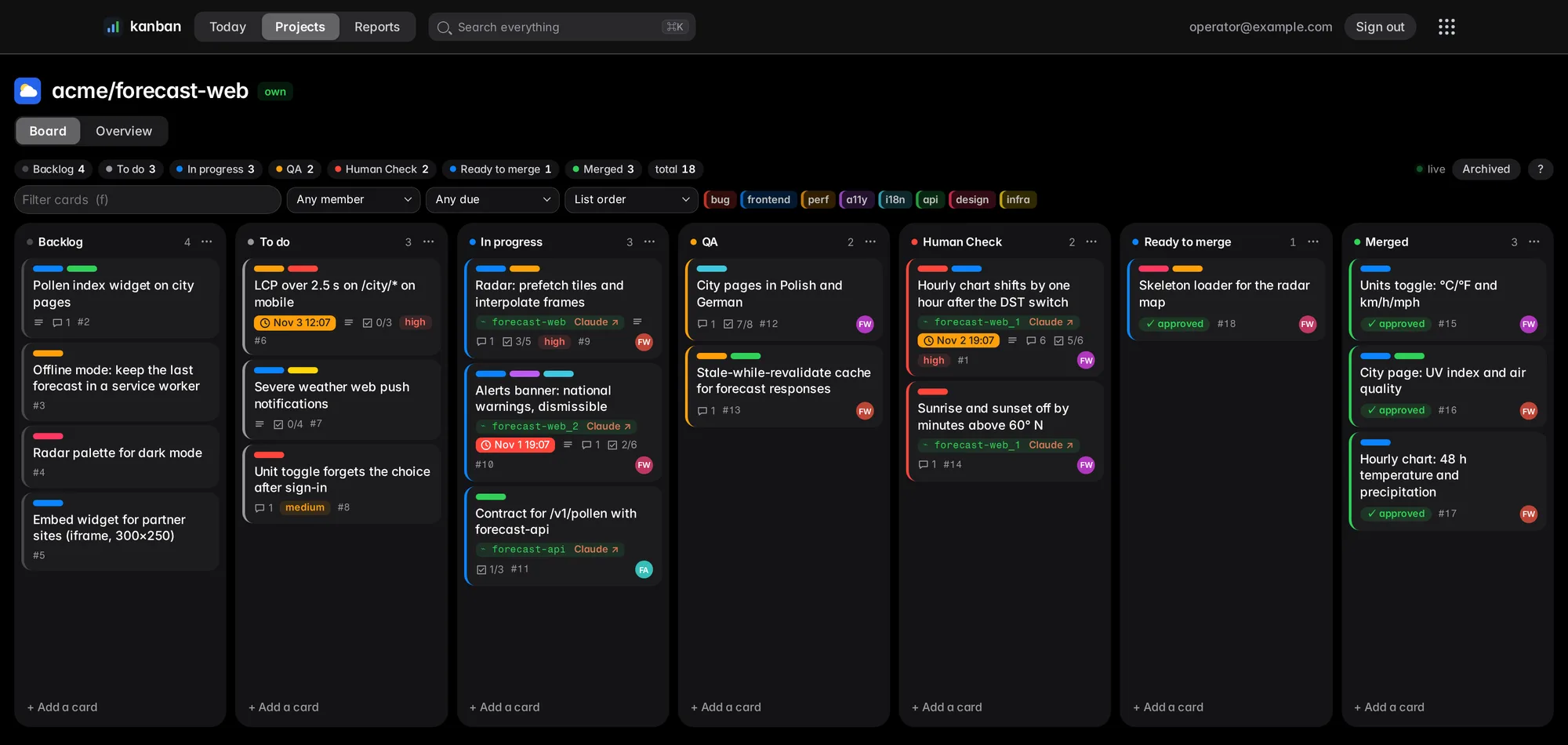
| rule | |
|---|---|
| Columns | Backlog · To do · In progress · QA · Human Check · Ready to merge · Merged (fixed) |
| Agents may | create, claim, comment, tick checklists, move up to Human Check |
| Only I may | approve a card: it moves from Human Check to Ready to merge. From there its agent merges and moves it to Merged; nothing else gets past Human Check |
| Card face | labels, due (red overdue, orange < 24 h), checklist done/total, comments, owner session (or “gone”) |
| Live | board and open card poll a content hash every 3 s; changed cards glow |
It behaves like Trello — drag and drop, labels, checklists, due dates, Trello’s keyboard shortcuts — and agents use the same cards I do, so there is no second tracker to keep in sync.
Adding new tickets is simple as counting to two
Just prompt it.
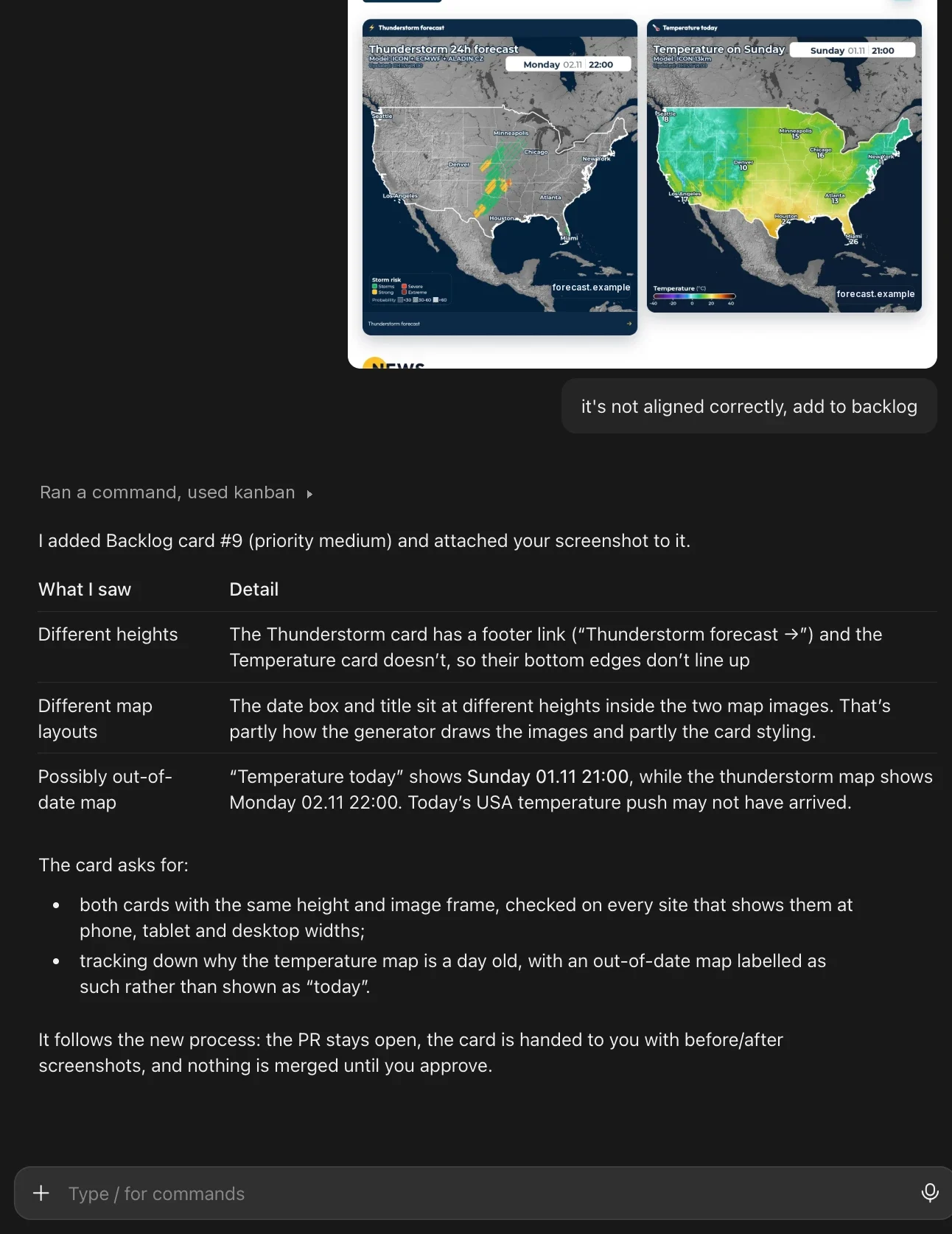
One sentence and a screenshot. The agent writes the rest of the card.
A team is a tmux session with Remote Control
The Launch button on a project starts Claude Code in a detached tmux session in that repo. Every launcher shell must contain --remote-control {session}; the launcher confirms the Remote Control process is up (and answers the folder-trust prompt) before it reports success. Any team can then be opened from the Claude app on my phone, attached over ssh, or typed into from the browser.
An Agents sidebar next to the board lists live sessions grouped by repo: state (working, idle, waiting on a prompt), model, title, and each session’s running subagents. It reads a collector snapshot from my agent_engines library through a host-side launcher socket. Clear idle stops idle sessions; attached, waiting and busy ones are always kept.
Agents work the board through MCP
The kanban’s MCP has 22 kanban_* tools. A session’s loop:
| step | tool |
|---|---|
| pick a card | kanban_board → kanban_claim(id, assignee, tmux_session) |
| plan | kanban_checklist_add, then kanban_checklist_toggle as items land |
| report | kanban_comment: markdown, tables, branch names, PR numbers, shas |
| hand over | kanban_move → QA → Human Check |
Passing tmux_session makes that session the card’s owner, which matters for the next part.
A comment reaches the agent without polling
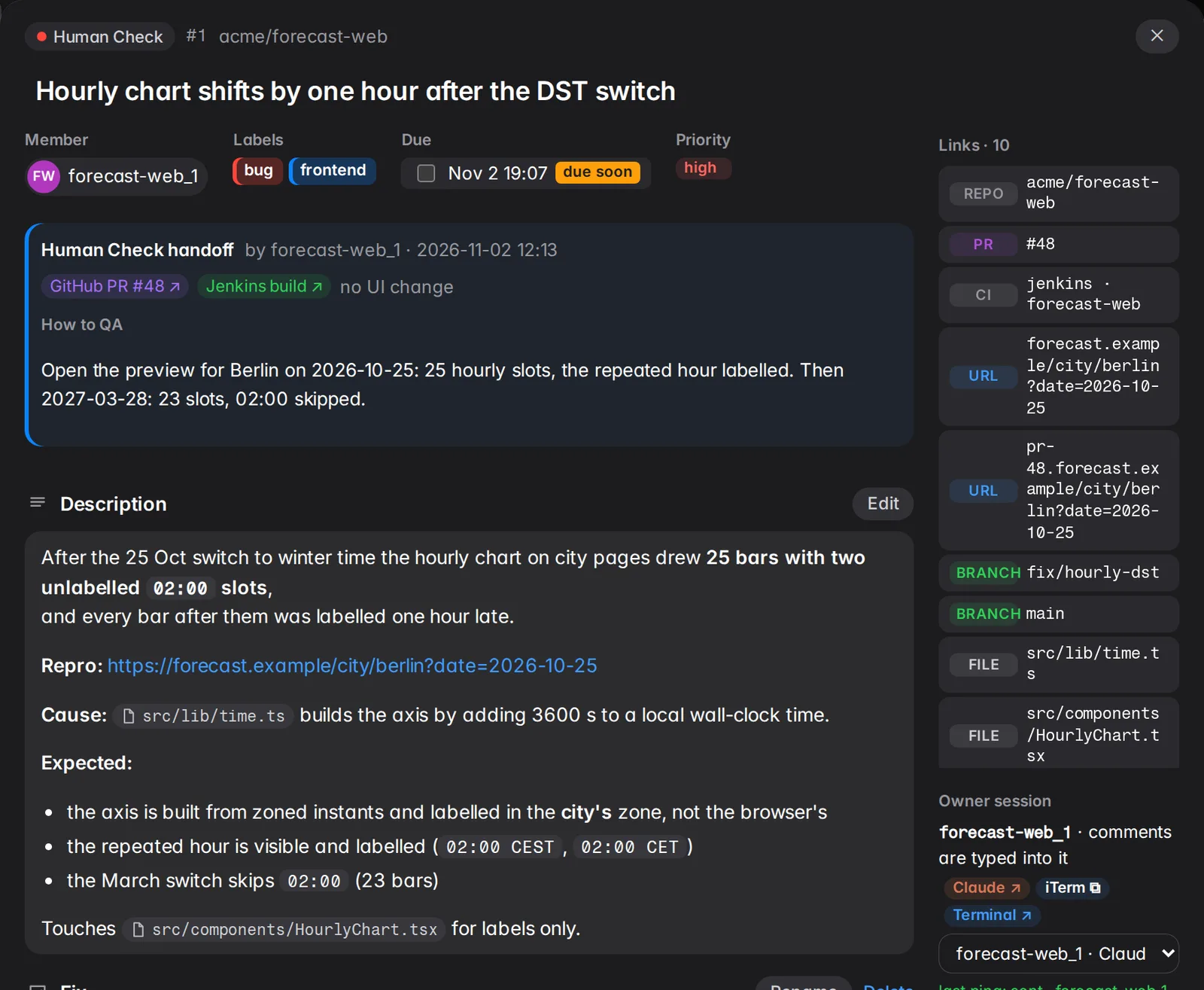
Card #1 above. The agent forecast-web_1 claimed it, fixed it on fix/hourly-dst, ticked its checklist, posted test results and moved it to QA; a QA agent signed off. Then it moved the card to Human Check and asked me one question:
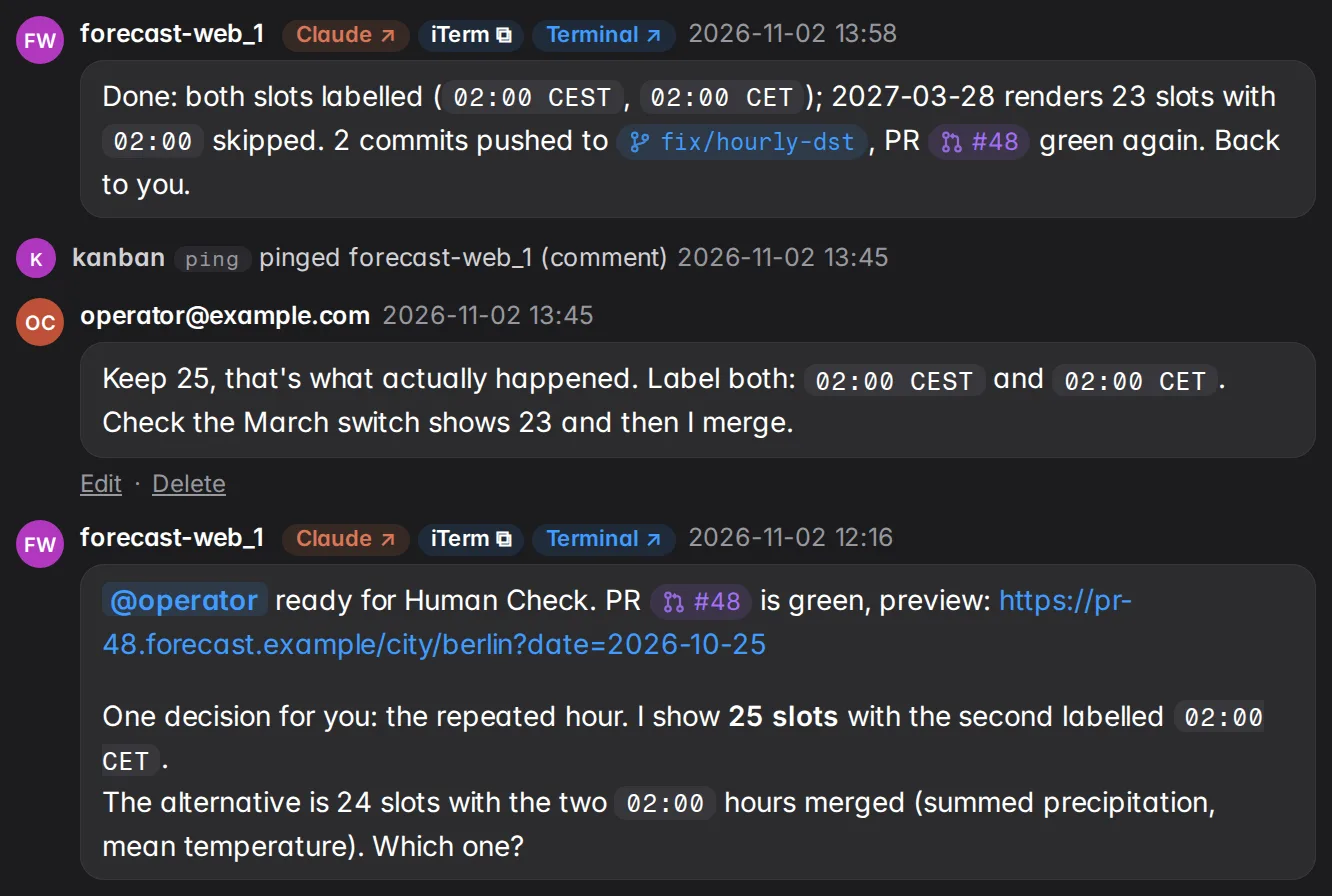
- The agent asks: 25 slots or 24 on the DST day.
- I answer in the card.
- The notifier types my comment into
forecast-web_1’s tmux session, with the card id and an instruction to reply viakanban_comment. Logged asping. - 13 minutes later the agent has pushed 2 commits and replied. Next step is mine: merge.
When I’m happy I press Approve to merge: the card moves to Ready to merge and the owner agent gets a ping. It merges, moves the card to Merged and posts the merge commit. Pulling the card back withdraws the approval.
Rules on the ping: never typed onto a dialog (the screen is re-read first), never the agent’s own words, bursts coalesced into one message. When I move a card, its owner is pinged too.
The Links rail is built from the title, description and comments: repo, URLs, branches that exist, repo files (linked on the branch that holds them), PR numbers, known commits. 10 links here, none typed by hand.
Next: a preview deploy for every Human Check card
Not built yet. Every card that reaches Human Check will get its own deploy on dokker, so I review the running change instead of the diff. The URL comes from the ticket’s name and id:
- card #1 →
hourly-chart-dst_1.dokker.example.com - card #14 →
sunrise-sunset-60n_14.dokker.example.com
The link lands in the card’s Links rail next to the PR, and the preview is torn down when the card reaches Merged.
When a session dies
A watchdog checks every owned card against the live sessions. If the owner is gone for more than 60 s, the card is unassigned, pending pings fail, and In progress goes back to To do, all logged by the board. On the mock board that is card #8 in To do: session forecast-web_3 is gone (74s). The next session can claim it.
The daily report
A systemd timer runs claude -p headless at 07:00: it rescans every repo, starts one subagent per repo with commits in the last 24 h, and posts one report to the dashboard. If the run fails, it posts a report titled FAILED instead of leaving a gap.
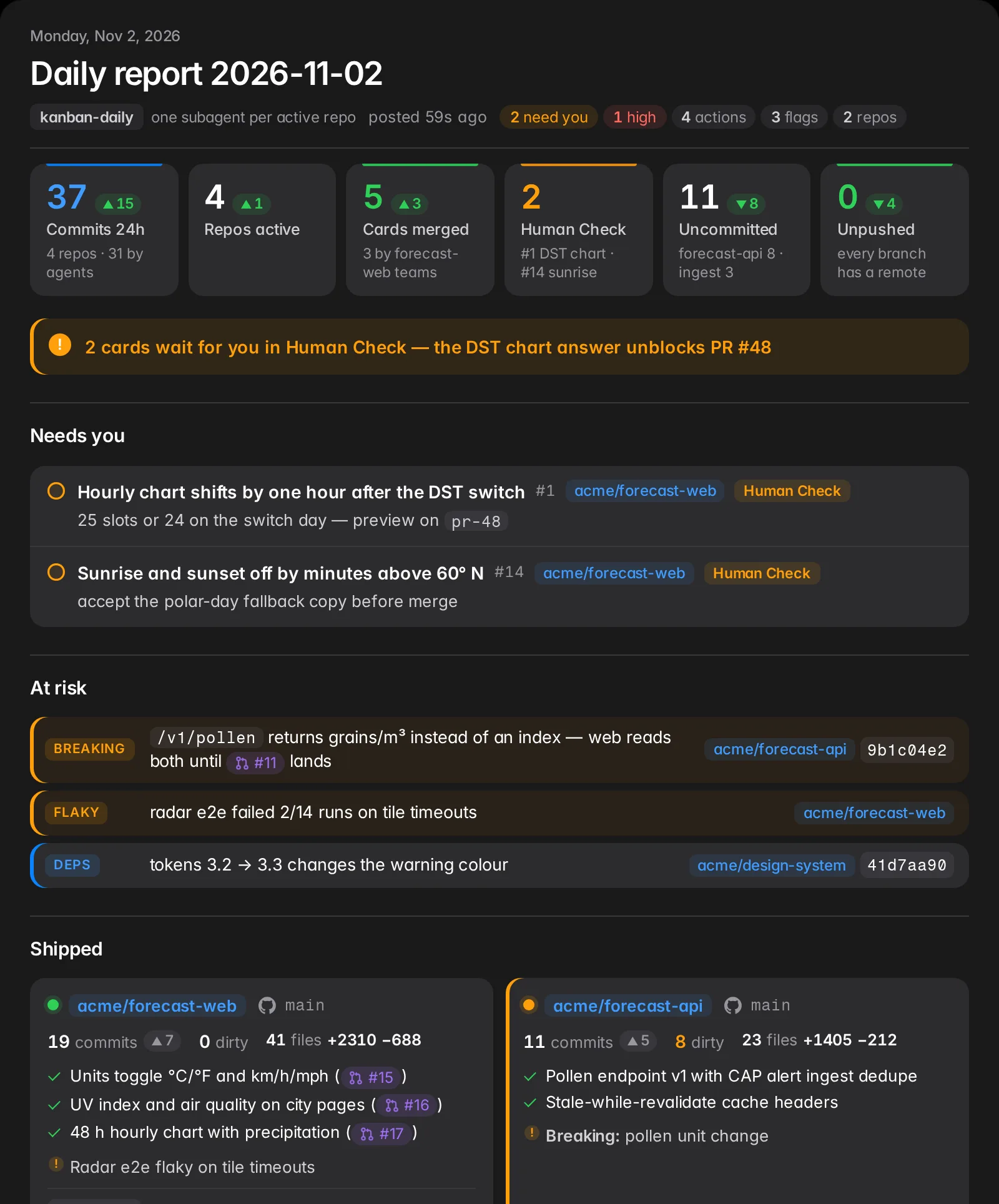
The model does not write prose and does not count anything. An MCP tool, daily_facts, computes the numbers (the last 24 h against the 24 h before, per-repo commits and churn, pending work, every card in Human Check), and the agents only add what shipped and what is at risk. The report is built from fixed blocks: figures, Needs you, At risk, Shipped, Changes, Act on. A second tool, check_report, rejects a report with a broken block or a repo it does not know before it is posted. The top of the report is the part I read first: what waits for me, then what can break.
Related
- AI engineering is like gardening — why the codebase is the agents’ biggest prompt, and every correction a check.
- How I reached 100 quality PRs a day with an agents kanban — the throughput half: backlog, agency, the numbers.