Local Weather Cluster, how to run ICON DWD at home?
A numerical weather model isn’t a webapp. You can’t horizontally scale it by adding stateless pods behind a load balancer — every rank has to talk to its neighbours every timestep, halos travel at hundreds of MB/s, and the slowest rank gates the whole forecast. So when one 32-core box wasn’t fast enough to run an ICON 2 km LAM forecast for Poland in under a wall hour, the answer wasn’t “add a queue and shard.” It was: build a real cluster, two hosts, one tightly coupled MPI job, and make it idempotent enough that ./run.sh start is the only command anyone has to remember.
This post walks through the implementation: the model, the hardware, the image, the launcher, the shared filesystem, the orchestration, and the numbers it produced.
The model and why a cluster
ICON is the operational global / limited-area weather model developed by DWD (Deutscher Wetterdienst) and MPI-M. Limited-Area Mode runs it over a regional grid — here a triangle mesh covering Poland at the IMGW R5B9 refinement (~2 km, 254 212 cells, 60 vertical levels). DWD’s own ICON-EU at 6.5 km is the source for initial conditions and lateral boundaries; ICON-LAM steps the local domain forward at higher resolution and resolves convection explicitly.
The dycore is non-hydrostatic on a triangular C-grid. A 20-second timestep with 5 dynamics substeps and a single rank-set means ~5400 timesteps per forecast hour, each one ending in a halo exchange. On 32 ranks of a Ryzen 9950X-class box this is ~0.142 timesteps per second, ~2.8× faster than wall-clock. Acceptable. But a 24 h forecast still needs ~8.5 h wall time, and the goal was twice-daily releases. So: spread it.
The two boxes
Two machines wired with a single direct 10 GbE link — no switch in the middle.
| Host | Arch | Cores | RAM | Role |
|---|---|---|---|---|
head-node | x86_64 (Ryzen AI Max+ 395) | 32 | 124 GiB | head — runs mpiexec, NFS server, prep/postprocess, web |
compute-node | aarch64 (NVIDIA Grace dev kit) | 20 | 119 GiB | peer — runs additional MPI ranks |
Two architectures, deliberately. The compute node is a Grace-based aarch64 dev kit that happens to be on the desk; throwing it in adds 20 cores of unused capacity for free. The catch — which becomes the central engineering choice below — is that MPI has to bridge x86_64 ↔ aarch64 in the same job.
The 10 GbE link is configured statically:
head-node:     enp1s0f0   192.0.2.1/30
compute-node:  enP1s0     192.0.2.2/30
Both ends keep the link up via a NetworkManager profile (icon-fast, autoconnect=yes). RTT is ~0.3–0.7 ms; raw SSH throughput is ~520 MB/s, which is encryption-bound, not link-bound. WiFi and the Tailscale fallback path are explicitly not used for cluster traffic: MPI halo exchanges are latency-sensitive and lossy paths cause synchronous stalls across every rank.
The MPI choice that nothing else flowed from
There are two practical MPI implementations on Linux: OpenMPI and MPICH. They have the same API, similar ABIs, comparable performance. For a homogeneous cluster you can use either.
For x86_64 ↔ aarch64 in one job, you cannot use OpenMPI 5. The intercommunicator setup it relies on for ICON’s asynchronous I/O server crashes immediately:
ompi_comm_get_rprocs: Not supportedOpenMPI dropped heterogeneous-arch support in the 5.x line. MPICH 4.2 keeps it. So the whole image switched to MPICH — not just the cluster image, also the single-host one, for consistency. This is the choice that everything below cascades from: per-arch images, SSH-based Hydra launcher, in-container sshd, custom port, manual host list.
If both your boxes were the same architecture, none of the next four sections would exist — you’d just use one image and a hostfile.
A per-arch, multi-stage image
The forecast container has two jobs: compile ICON against MPICH (once), then run the binary with the right environment at forecast time. Splitting those into a multi-stage Dockerfile keeps the runtime image small (no compilers, no source tree) and makes the build cacheable per-arch.
# Stage 1 — build ICON against MPICH
FROM debian:stable-slim AS builder
RUN apt-get update && apt-get install -y --no-install-recommends \
        gcc g++ gfortran make m4 perl python3 cmake \
        mpich libmpich-dev \
        libnetcdf-dev libnetcdff-dev \
        libblas-dev liblapack-dev \
        libeccodes-dev libfyaml-dev libxml2-dev
WORKDIR /build
RUN --mount=type=bind,from=icon-model,target=/src,readonly \
    /src/config/generic/gcc && \
    make -j"$(nproc)" 2>&1 | tail -30 && \
    install -D -m 755 bin/icon /opt/icon-out/icon

# Stage 2 — runtime only
FROM debian:stable-slim
ENV HYDRA_LAUNCHER_EXTRA_ARGS="-p 2222 -i /root/.ssh/id_ed25519 \
    -o StrictHostKeyChecking=no -o UserKnownHostsFile=/dev/null \
    -o LogLevel=ERROR"
RUN apt-get update && apt-get install -y --no-install-recommends \
        mpich libmpich-dev libnetcdf-dev libnetcdff-dev \
        libgomp1 libgfortran5 \
        openssh-server openssh-client \
        python3 gettext-base
COPY --from=builder /opt/icon-out/icon /opt/icon/bin/icon
COPY forecast/sshd_mpi.conf     /etc/ssh/sshd_mpi_config
COPY forecast/entrypoint-mpi.sh /usr/local/bin/entrypoint-mpi.sh
ENTRYPOINT ["/usr/local/bin/entrypoint-mpi.sh"]
Two things to internalise:
- The image is per-arch.
docker buildon head-node produces an x86_64 image, on compute-node an aarch64 image. The tag (icon-pl-forecast-mpi:latest) is the same on both hosts; the underlying manifests are different. We rebuild on both hosts after any change to ICON source —docker buildxcould produce a multi-arch manifest, but the source tree mounted via--build-context icon-model=…is large and the wins aren’t worth it. - The build context root is
/srv/leometeo— not theicon-lam-pl/subdir — so the Dockerfile’s--mount=type=bind,from=icon-modelcan reach a sibling directory. Build is invoked with--build-context icon-model=$PWD/icon-model.
The legacy icon-build service in docker-compose.yml that produced a shared icon_bin/ volume is not used by the cluster path. The binary lives inside the per-arch image. Single-host compose runs still use it, for backwards compatibility.
Cross-container SSH for the Hydra launcher
MPICH’s process manager is Hydra, and its default cross-host launcher is plain ssh. To launch ranks inside a peer container, the head’s mpiexec needs to SSH into the peer container — not into the host. Standard sshd on the host is on :22; ours runs inside the container on :2222.
# forecast/sshd_mpi.conf
Port 2222
ListenAddress 0.0.0.0
PermitRootLogin prohibit-password
PubkeyAuthentication yes
AuthorizedKeysFile /root/.ssh/authorized_keys
PasswordAuthentication no
UsePAM no
AcceptEnv OMPI_* PMIX_* PMI_* HYDRA_* OMP_*
HostKey /etc/ssh/ssh_host_rsa_key
HostKey /etc/ssh/ssh_host_ecdsa_key
HostKey /etc/ssh/ssh_host_ed25519_key
The container runs --network=host, so the port is real and reachable as compute-node:2222 from outside. The entrypoint stages a keypair, generates host keys idempotently, and exec’s sshd before the forecast runs:
# forecast/entrypoint-mpi.sh
if [ "${MPI_DISTRIBUTED:-0}" = "1" ]; then
    install -d -m 700 /root/.ssh
    install -m 600 /root/.ssh-mpi/id_ed25519      /root/.ssh/id_ed25519
    install -m 644 /root/.ssh-mpi/id_ed25519.pub  /root/.ssh/id_ed25519.pub
    install -m 600 /root/.ssh-mpi/authorized_keys /root/.ssh/authorized_keys
    ssh-keygen -A >/dev/null                           # idempotent
    /usr/sbin/sshd -f /etc/ssh/sshd_mpi_config
fi
exec "$@"
The keypair lives at ~/.ssh-mpi/ on each host (id_ed25519 + id_ed25519.pub + authorized_keys — both hosts trust the same single key). It’s mounted into the container read-only as /root/.ssh-mpi. The container’s /etc/hosts is patched at start-up to point head-node and compute-node at the 10 GbE addresses:
docker run … --add-host head-node:192.0.2.1 --add-host compute-node:192.0.2.2 …That last part is what routes MPI traffic over the fast link without anyone having to configure routes inside the container.
sshd on :2222, then spawns a proxy that fork-execs the per-rank ICON processes.A shared filesystem nobody talks about
ICON writes one large NetCDF file per rank-output plus a few central namelists, but the inputs are the load-bearing thing: every rank reads the same grid file (lam_imgw_R5B9.nc), the same EXTPAR (orography, land cover), the same per-cycle IC file, and 24 hourly LBC files. Having two hosts each maintain their own copy is a coherence headache no one needs.
So head-node runs an NFS server. The two paths it exports are exactly the two paths the head needs to be able to read and write from on both sides:
# /etc/exports.d/icon.exports     ← note the .exports extension
/srv/icon/icon-lam-pl                                     192.0.2.0/30(rw,sync,no_subtree_check,no_root_squash)
/srv/leometeo/icon-lam-pl-runtime/forecast_work_poland    192.0.2.0/30(rw,sync,no_subtree_check,no_root_squash)
On compute-node those paths are NFS-mounted at the same absolute paths, so containers see identical mount points on both hosts and the bind-mount lines in docker run are byte-identical.
A word on no_root_squash: it’s there because the forecast containers run as root and have to own the files they write into the shared workdir, and it is only defensible because the export is clamped to a two-address point-to-point /30 that carries nothing but this cluster. Do not copy that flag onto a routable or shared network — with no_root_squash, any client that can reach the export writes as root on the server, which is a straight path to owning the NFS host. On anything less isolated than a direct cable, drop it (root_squash is the default) and fix the ownership problem with a matching non-root UID inside the container instead.
Two gotchas that ate hours:
/etc/exports.d/*.exports, not*.conf. Debian’sexportfssilently skips files with any other suffix. The line was correct; the filename wasn’t, andshowmount -e localhostshowed nothing.- The partition behind
/srv/iconhad to be reformatted from exFAT to ext4. exFAT can’t be NFS-exported (no inode numbers, no NFS handles). The conversion preserved the ICON model source and binaries — moved them aside, mkfs.ext4 the partition, moved them back. Once. After that the entire pipeline could assume symlinks and POSIX semantics everywhere.
The static read-only inputs (/opt/icon-data, /opt/icon-vct, /opt/forecast) are compute-node-local clones rather than NFS — they’re tiny, immutable, and faster to read off local NVMe. The path layout is faked with sudo ln -sfn so the bind-mount lines still work.
Bridging open data to ICON: the missing vertical remap
Before any of the cluster orchestration matters, the forecast has to have initial conditions. And this is the place where running ICON on a home machine almost broke before it started.
ICON’s official preprocessor for limited-area runs is iconremap, shipped as part of dwd_icon_tools. It’s the canonical way to turn a global-model analysis into a LAM IC. It expects, however, high-resolution IFS analyses or full ICON analysis fields — neither of which is on a public server. Getting them requires a DWD or ECMWF account and an institutional context that a home setup doesn’t have.
What is public, on the DWD Open Data Server, is ICON-EU forecast output: GRIB2 files at hourly cadence, 6.5 km resolution, model levels 10–74 of the global ICON-EU vertical grid. CDO can take those and do a horizontal remap onto an arbitrary LAM grid with a single remapdis call. Solved problem.
What CDO does not do, and what dwd_icon_tools/iconremap would have done, is the vertical step:
- Interpolate every atmospheric field (T, U, V, W, P, QV, QC, QI, …) from ICON-EU’s height levels onto the target LAM’s terrain-following SLEVE coordinate.
- Handle the case where the LAM surface lies below ICON-EU’s lowest available level (~1700 m AGL over the smoothed ICON-EU orography of the Tatra mountains) — with physically sensible extrapolation, not a constant copy.
- Add the fields ICON’s runtime
check_variablesrequires but neither CDO nor DWD opendata provides: surface geopotentialGEOSP, vertical windWon half-levels (DWD publishes full-level W; ICON wantsnlev+1half-level entries).
Without (1) ICON’s vert_interp_atm blows up in 40 seconds because source heights don’t agree with the LAM’s target SLEVE. Without (2) the LAM produces a famous “175 km/h surface gust” spike because the free-troposphere wind from ICON-EU’s lowest model level gets propagated unchanged down to the LAM’s actual surface. Without (3) the forecast won’t start at all.
So I wrote iconremap — a small Python module (MIT) that fills exactly that gap. Not a replacement for the full DWD tool, just the open-data path.
What it does, in one paragraph
Read the CDO-horizontally-remapped IC NetCDF and the LAM EXTPAR (which carries the target topography HSURF). Compute the LAM’s target half-level heights z_ifc from vct_a + SLEVE namelist parameters, using the exact algorithm from ICON’s mo_init_vgrid.f90 so the heights match what ICON computes at runtime to the centimetre. Terrain-shift the source HHL so the source bottom anchors at LAM topography (otherwise interpolation happens in absolute height, asking “what’s the wind 10 m above the LAM’s Tatra peak?” using data that only goes up to 10 m above DWD’s smoothed-down Tatra — different absolute altitude entirely). Then for each variable, run a per-cell vertical interpolation with physics-aware extrapolation outside the source range:
| Variable | Below source surface | Above source top |
|---|---|---|
| T | dry-adiabatic lapse | isothermal stratosphere |
| P | hydrostatic balance using local T | hydrostatic decay |
| QV | Clausius–Clapeyron at extrapolated P | Brewer–Dobson decay (H ≈ 2 km) |
| QC / QI / QR / QS | zero | zero |
| U / V / W | log-law surface-layer decay, capped at ±25 m/s | constant |
The log-law wind extrapolation is the one that matters in practice — that’s the line of code that turns the spurious 175 km/h surface gust into a believable 70 km/h frontal gust. Finally, attach the LAM’s z_ifc as the new HHL, derive GEOSP = HSURF × g, and pad W from full to half levels by averaging adjacent full-level values. Write the NetCDF; ICON ingests it directly.
The code is small — a few hundred lines across sleve.py (SLEVE z_ifc computation transcribed from ICON Fortran), vertical.py (the interpolation + extrapolation), meteo.py (the physics constants), pipeline.py (glue). Bind-mounted into the prep container as a Python dist-packages entry; called once per cycle from post_prep.sh:
python3 -m iconremap --input "$PRE_IC" --extpar "$EXTPAR" --output "$IC_NC" --quietIt’s MIT-licensed, on github.com/robertziel/iconremap, and it’s the difference between “ICON LAM is for institutions” and “ICON LAM is for anyone with a laptop and a public-internet connection.”
The orchestrator: one run.sh, three commands
The single source of truth is run.sh, ~475 lines of bash that owns prep, forecast, postprocess, cluster lifecycle, and an auto-render watcher. Its public surface is small:
./run.sh                              # status
./run.sh start                        # = --region poland --hours 24 --machines compute-node,head-node
./run.sh start --hours 6
./run.sh start --machines head-node   # single-host MPI on the head node
./run.sh start --no-render
./run.sh stop
./run.sh restart --hours 12
The flow start runs is deliberate, and each phase fails fast:
.cluster_hosts, render PID file) to survive between invocations.A few details that matter:
- Peer containers start before the head. The head’s
mpiexecimmediately tries to SSH into each peer; if the peer’s sshd isn’t yet bound to:2222it fails withConnection refused. Socluster_start_forecastpollsss -tln | grep ':2222 'on each peer for up to 20 s before launching the head. Cheap and reliable. - State lives outside the script.
.cluster_hostsis written under/srv/icon/.../poland/. Running./run.sh stopfrom a different shell three days later still knows which peers to tear down, because it reads that file. clean_regionis selective. It wipes per-cycle intermediates (IC, LBC, forecast_out, plots) but keeps the ICON-EU GRIB cache and the precomputedhhl_lam.nc. Deleting the latter brickspost_prepbecause no pipeline step recreates LAM half-level heights.- Auto-render is a separate background process.
nohup "$0" __watch_render &re-execs the same script in a watcher mode that pollslast_postprocessed_cycleand kickslm_data_fetcherto publish the latest plots to the public website.
Per-rank pinning and the IO server
Inside the forecast container the actual mpiexec line — for the cluster path — is small:
mpiexec \
    -launcher ssh \
    -hosts "$MPI_HOSTS" \
    "$ICON_BIN" 2>&1 | tee icon.log | tail -50
$MPI_HOSTS is built up as head-node:32,compute-node:20. MPICH then divides global ranks across hosts in declaration order: ranks 0–31 on head-node, 32–51 on compute-node. Order matters here: ICON dedicates the last rank to its asynchronous output server, and the aarch64 build of ICON has a latent SIGILL bug in its CDI varID lookup under certain namelist combinations. Putting the IO rank on head-node (x86_64) by listing it last sidesteps the bug. Hence the default --machines compute-node,head-node — the order is load-bearing, not cosmetic.
Each host’s rank count is configurable via HEAD_RANKS / PEER_RANKS env vars. Defaults match physical core counts: 32 and 20 → 52 ranks total. OMP_NUM_THREADS=1 everywhere — ICON’s gain from threading on top of MPI on this size of domain is negligible and complicates pinning.
The namelist sets a single I/O proc and one prefetch proc:
¶llel_nml
num_io_procs = 1
num_prefetch_proc = 1 ! mandatory for itype_latbc=1
/So of the 52 ranks: one async output writer, one LBC prefetcher, 50 compute ranks. Halo exchanges fan across all of them every 4 ns of model time.
What the numbers look like
The interesting metric isn’t “tokens/s” — it’s Time step: rate, which ICON logs every step. After ~10 minutes of run the dycore is in steady state and the rate is stable. Recorded:
| Case | Ranks | Steps in 10 min | steps/s | Forecast/wall |
|---|---|---|---|---|
| head-node only | 32 | 85 | 0.142 | 2.83× |
| compute-node only | 20 | 70 | 0.117 | 2.33× |
| mixed cluster | 52 | 124 | 0.207 | 4.13× |
The 20% gap from theoretical is structural:
- Cross-host halo exchanges ride the 10 GbE link, not local shared memory. Even at 0.5 ms RTT this is two orders of magnitude slower than the on-die fabric the local ranks use.
- Slowest-rank gating. Every collective waits for the slowest participant; one slow compute-node rank pauses 51 others.
- Async LBC + I/O collectives. The prefetcher and the output writer have to coordinate cross-host too.
For a 6 h forecast the cluster saves ~22 min of wall vs. single-host head-node. For a 24 h forecast it saves ~3.5 h, which is the whole reason this exists.
Why this layout, in retrospect
A few decisions did most of the work:
| Choice | Why | What it bought |
|---|---|---|
| MPICH over OpenMPI 5 | Heterogeneous-arch support | x86 + aarch64 in one job |
| Multi-stage Docker, per-arch tags | Cacheable build, slim runtime | Single docker run line works on either host |
In-container sshd on :2222 | Hydra needs to launch into peers, not into hosts | Process isolation, no host sshd changes |
| NFS over the 10 GbE link | Single writable workdir | Identical bind-mount strings on both hosts |
--add-host head-node:192.0.2.1 | Force traffic onto the fast link | No router config, no static routes |
One run.sh | Idempotent state machine | start/stop/restart survives reboots and partial failures |
Things that are not in this stack and would have been over-engineering for two hosts: Kubernetes, Slurm, an external scheduler, a service mesh, a metrics backplane. The state is in two text files (latest_cycle, .cluster_hosts) and docker ps. The right amount of infrastructure for two boxes is approximately none.
How does it compare to a reference operational model?
Throughput and engineering are interesting, but the only number that matters in the end is whether the forecast is useful. A side-by-side against a reference operational model is the cheapest sanity check.
The two maps below show 24-hour accumulated precipitation over the same domain (Poland), forecast on consecutive cycles by two different models at comparable resolution.
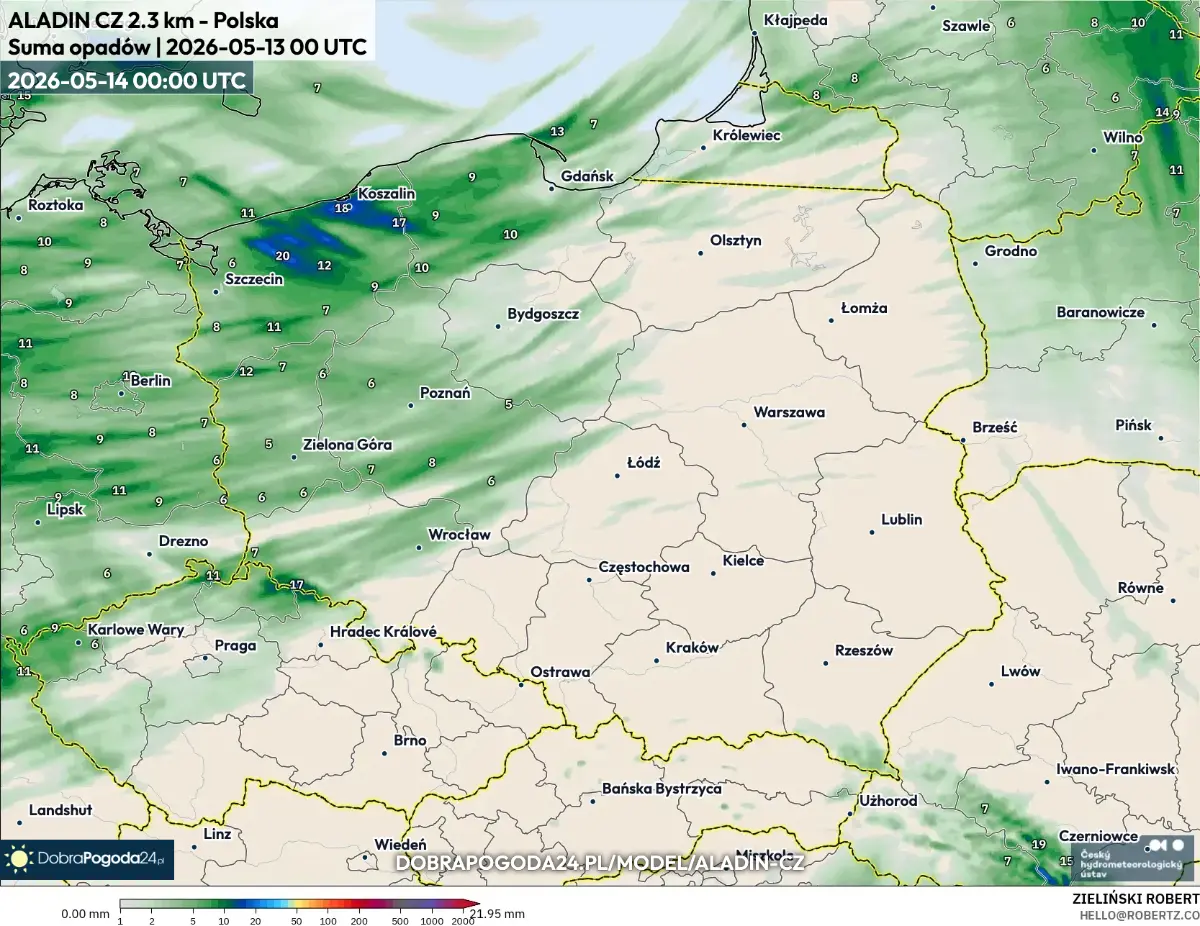
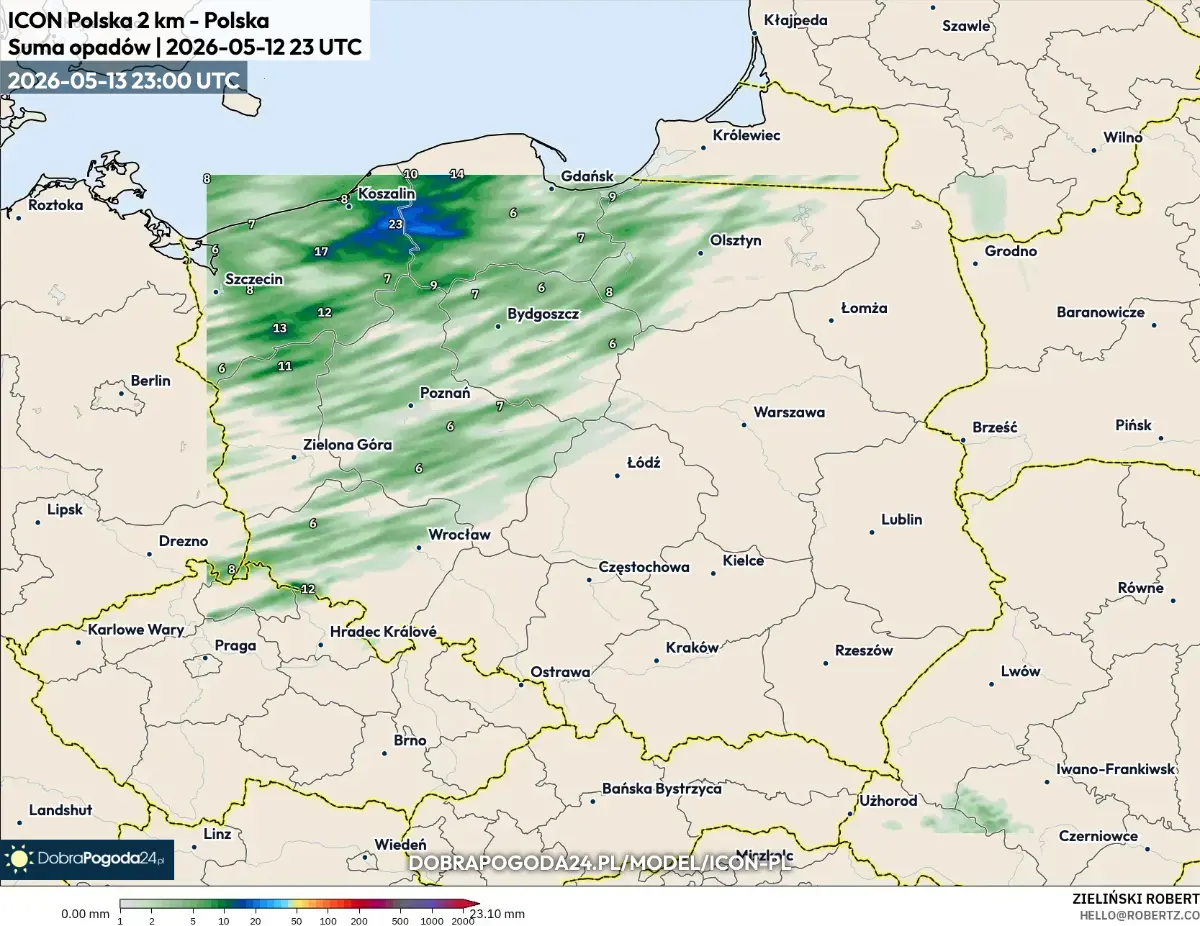
What the comparison actually tells us:
- Spatial signature agrees. Both models put the heaviest band of precipitation across the NW (Koszalin–Szczecin–Gdańsk corridor) with totals in the 15–25 mm/24 h range, drying out south-east toward Wrocław and the Carpathian foothills. Two independent models, two independent data assimilation chains, two different physics packages — the agreement on the spatial pattern is the strongest signal that the local LAM is producing physically reasonable output, not a numerical artefact.
- Peak intensities are similar. ALADIN peaks at ~21.95 mm on the coast near Koszalin; the local ICON-LAM peaks at ~23.10 mm in the same area. Within ~5% of each other on the maximum is well inside the model-to-model spread for convective-scale precipitation at +24 h.
- The differences are the interesting part. ALADIN spreads more light precipitation (4–10 mm) across the whole north and east of Poland — it’s running a 24-hour-later valid time and is seeing a slightly different synoptic state. The local ICON keeps the precipitation more banded along frontal structures, consistent with explicit convection at 2 km with the COSMO cloud scheme. Neither is “right” or “wrong” — they’re two valid samples of the forecast uncertainty.
- Coverage caveat. The local-ICON data extent in this snapshot covers only the NW portion of the domain — that’s the area where the model produced non-zero accumulation; the rest of the LAM grid evolved a dry forecast and shows the basemap underneath the rendering pipeline’s transparency mask.
This is the bar a home cluster has to clear: not “do my numbers match the reference exactly,” but “are they in the same family.” For a stack that’s two boxes, one cable, and a bash script, landing inside the model-to-model spread of an operational reference is the result that justifies the existence of every section above.
Things that will bite you
Useful to know up front:
- Heterogeneous MPI is fragile. ICON happens to be written portably enough that x86 ranks and aarch64 ranks agree on byte representation and ordering of every collective. Most scientific codes are not. Test with a tiny domain before committing.
/work/<cycle>files are root-owned in-container, so user-shellrm -rfsilently no-ops. Useclean_region(which runs inside docker) ordocker run --rm -v …:/work debian rm -rf /work/<cycle>.- Both hosts must mirror
forecast/at the same absolute path. After editing a namelist or post_prep, rsync tocompute-node-fast:/srv/leometeo/icon-lam-pl/forecast/. - Don’t rely on OpenMPI 5 ever working cross-arch. It’s not a config issue. The codepath simply isn’t supported.
/etc/exports.d/*.exports, not*.conf. I will keep repeating this until nobody else loses an evening to it.- The IO rank lands wherever the last host in
--machinesputs it. Keephead-nodelast unless you’ve patched the aarch64 CDI lookup.
TL;DR: A home weather-forecast cluster is two boxes, one direct 10 GbE cable, one shared NFS workdir, MPICH (not OpenMPI), a per-arch multi-stage container with an in-container sshd on a non-standard port, and one bash script that knows how to start, stop, and recover. The cluster runs a 24 h ICON-LAM forecast at ~4× real-time — 1.46× faster than the bigger box alone — for the cost of putting a switch’s worth of cable between two machines that were already on the desk.
Sources
- iconremap — companion Python tool for the open-data IC path (MIT)
- ICON model — DWD documentation
- dwd_icon_tools — DWD’s official preprocessor (requires institutional access)
- CDO — Climate Data Operators
- MPICH Hydra process manager
- OpenMPI heterogeneous support note
- DWD ICON-EU opendata
- Linux NFS exports(5) — exports.d directory