catflops_fleet — one gateway and control panel for the LLM servers you run yourself

catflops_fleet is the always-on front of a self-hosted LLM fleet. Its pitch is one line:
An always-on gateway and control panel for the LLM servers you run yourself.
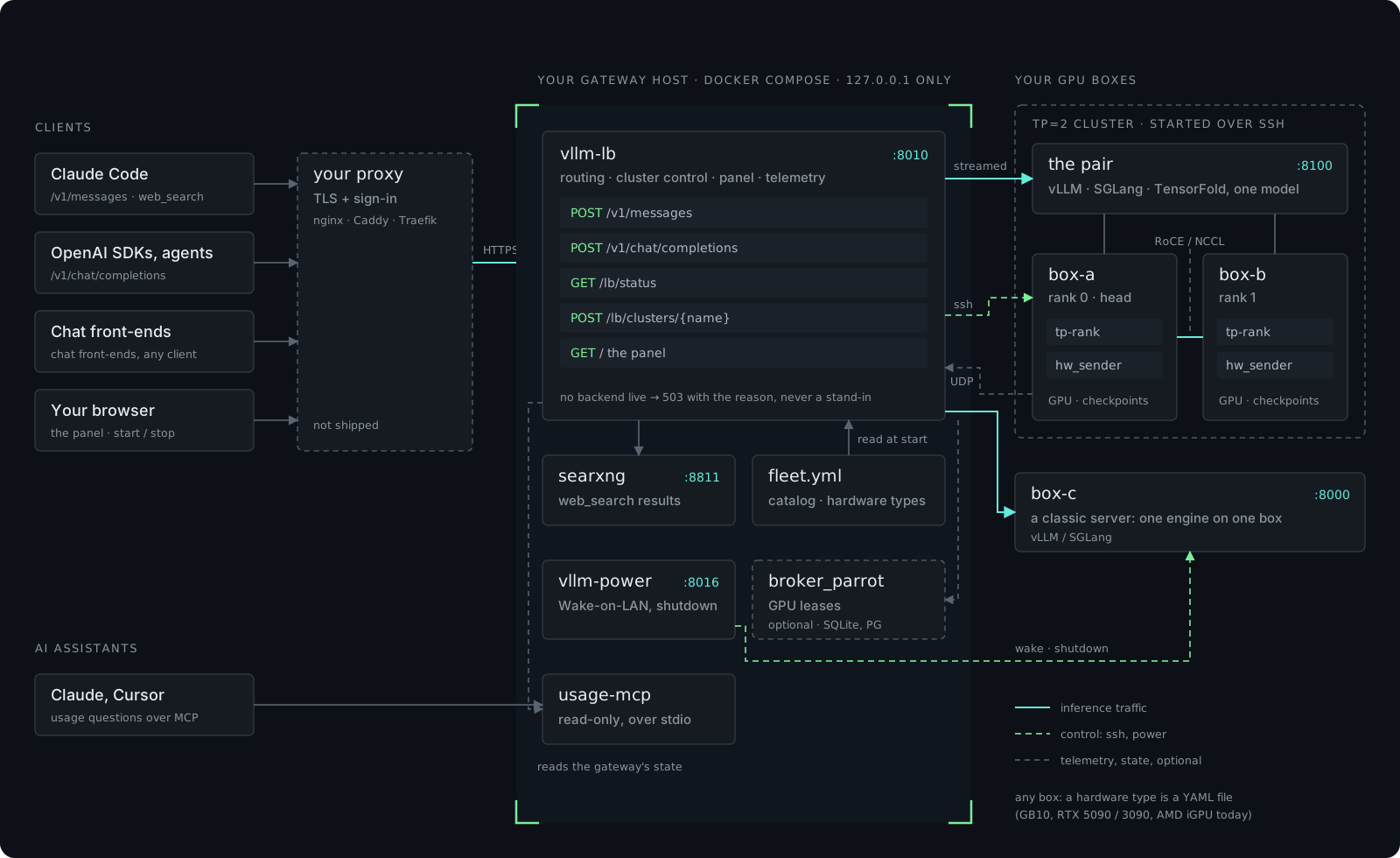
It sits in front of the vLLM, SGLang and TensorFold servers you already run and speaks both the Anthropic /v1/messages and the OpenAI /v1/chat/completions APIs, so Claude Code, OpenAI-style SDKs and any chat front-end share one endpoint. A panel on the gateway starts and stops a two-box tensor-parallel cluster, shows what each box’s memory, bandwidth and compute are doing, and answers Claude Code’s server-side web search itself. It runs no inference engine of its own: it routes to the servers you name.
Status: 1.0.0-beta, Apache-2.0. Every service runs in daily production, but the configuration surface — the fleet YAML, the hardware types, the per-service .env files — is still settling and may change between beta releases.
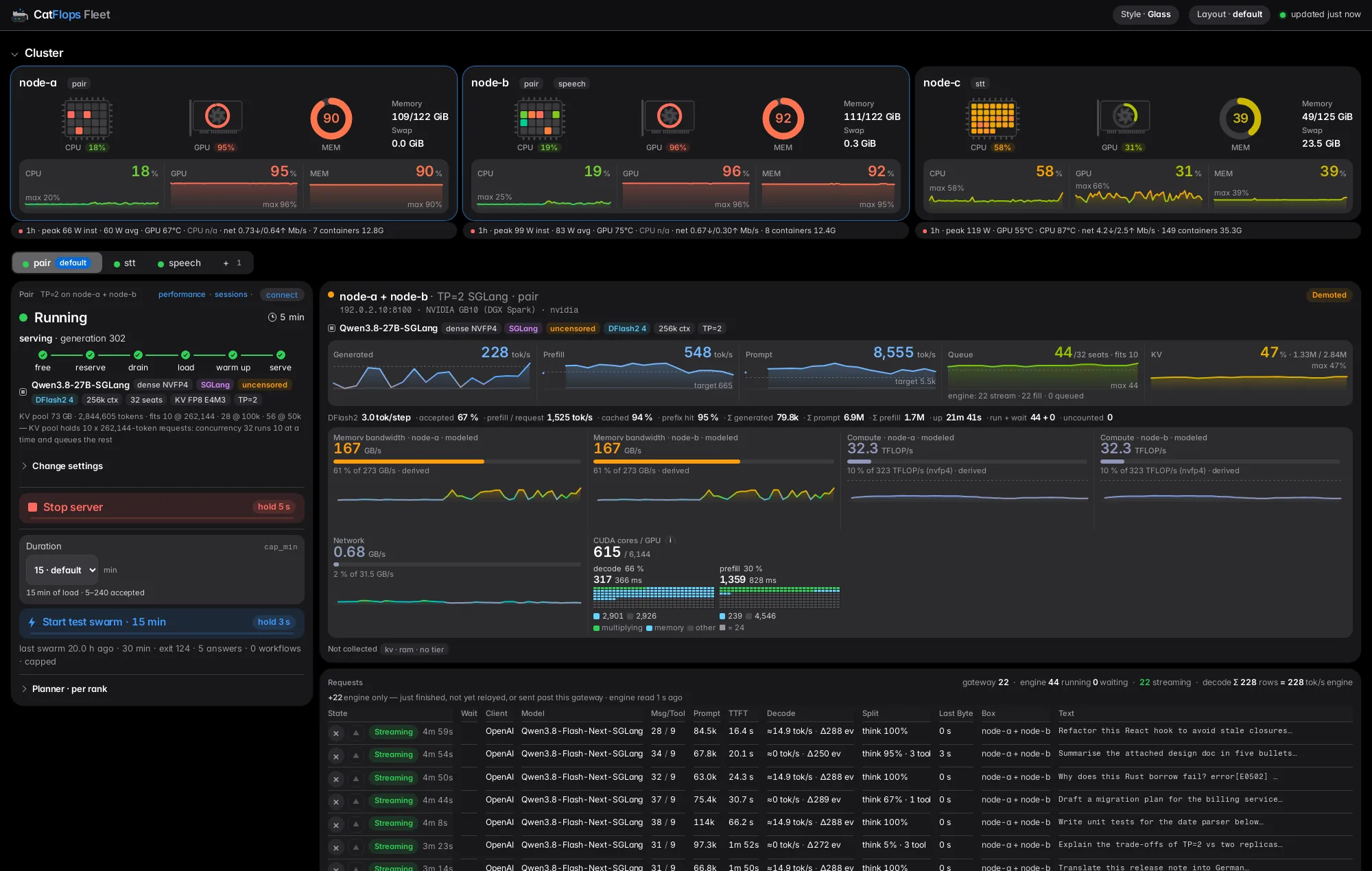
That’s the gateway page with a TP=2 SGLang pair under full load: per-box CPU, GPU and memory at the top, the pair’s state machine on the left (free → reserve → drain → load → warm up → serve), throughput, queue and KV in the middle, modeled memory bandwidth and compute per box, and every live request at the bottom.
What’s in the box
| Piece | What it is |
|---|---|
lb/ — vllm-lb (:8010) | The always-on gateway: routing, the cluster control plane, the panel, hardware telemetry, benchmarks and swarms, a bundled SearXNG for web search |
power/ — vllm-power (:8016) | Wake-on-LAN and shutdown of the fleet’s boxes; dry-run unless POWER_DRY_RUN=0 |
usage-mcp/ | The fleet’s own usage data as read-only MCP tools, so an AI assistant can answer “what ran, and how much” |
deploy/ | Image recipes per engine, checkpoint staging, a standalone one-box fleet, example edge vhosts, and the publishability guards |
dashboard/ | Legacy: polls the vLLM servers named in VLLM_SERVERS directly |
Each service is its own Docker image, a stdlib-only Python package at runtime, with a test suite that runs hermetically — no network, no GPU.
One endpoint, two APIs
Every request goes to a live backend the fleet file names, and the model field is rewritten to whatever that backend actually serves. Point Claude Code at it with ANTHROPIC_BASE_URL=http://127.0.0.1:8010; point an OpenAI client at http://127.0.0.1:8010/v1. Streaming, tool use and server tools work on both wire formats.
One server tool gets special treatment. Claude Code’s WebSearch is a server-side tool. The gateway recognises the web_search_20250305 request, queries its bundled SearXNG, and synthesises the server_tool_use + web_search_tool_result blocks itself — the native tool works with no client configuration. (Why SearXNG, and what a search costs in tokens: Web search for local LLMs.)
No fallbacks
This is the rule the whole project is built around:
- No backend live → wait, then 503 with the reason. The gateway holds a request for
LB_ADMISSION_WAIT_Swhile a backend comes up, then refuses, naming why. Never a stand-in model, never a cached number. - A missing config value stops the service by name. No defaults, no auto-detection. A retired env name is refused at boot, naming its replacement.
- A model never measured on your accelerator is refused — unless you start it explicitly, sized by the estimate, and it is labelled “estimated” wherever it shows up.
A fallback produces an answer that looks like the real one and isn’t. The failure gets discovered later, downstream, by someone who trusted the number; a 503 with a reason is cheaper.
Tensor-parallel from a panel
One switch on the panel — or POST /lb/cluster — runs a model tensor-parallel across two boxes. Setup is an SSH key for the gateway and a fleet file naming both boxes; nothing is installed on the boxes, because the rank launcher (lb/cluster/tp-rank) ships in the gateway image and runs over SSH.
On Start the gateway:
- picks the model from its library and resolves it on the cluster’s cards — engine × accelerator × platform → an image, or a refusal naming the missing piece;
- asks each box whether it actually has the checkpoint;
- estimates the per-box memory cost before starting anything (
GET /lb/cluster/estimateshows it as you pick); - starts one rank per box, head first, told the topology as facts (TP size, nodes, GPUs, link, memory, platform);
- routes to the pair once its head answers
/health.
The switch is a file, so restarts and redeploys resume it, chosen model included. Changing the model while the pair runs is a 409 — both ranks would have to reload, so you stop it first. Load progress is one bar per load pass, never an ETA.
| Your cards | Fleet shape | Rank launcher is told |
|---|---|---|
| one card | a one-host node | — (the standalone fleet) |
| two hosts, one GPU each, RDMA | control: ssh, link: roce, two ranks | TP 2 · NNODES 2 · LINK roce |
| two hosts over plain Ethernet | link: ethernet | NCCL sockets, NCCL_IB_DISABLE=1 |
| several GPUs in one host | TpOneHost (pcie / nvlink) | TP n · NNODES 1 — planner wiring is still open |
A deployment is configuration, not code
What a fleet is — its boxes, its cards, its clusters and who controls them — lives in one gitignored YAML file, lb/fleet.yml. Everything else is a committed library you extend once and every deployment shares. The design splits what used to be one glued-together catalog row into five independent axes:
| Axis | What | Where |
|---|---|---|
| Model | what the checkpoint is | library/models.json — facts read from its config.json |
| Engine | the server software | library/engines/<engine>.yml + one behaviour class |
| Accelerator | what kernels target | hardware/accelerators/<key>.yml |
| Card type | one product | hardware/types/<key>.yml — every figure with its source |
| Topology | cards and how they’re joined | one card · TP within a host · TP across hosts |
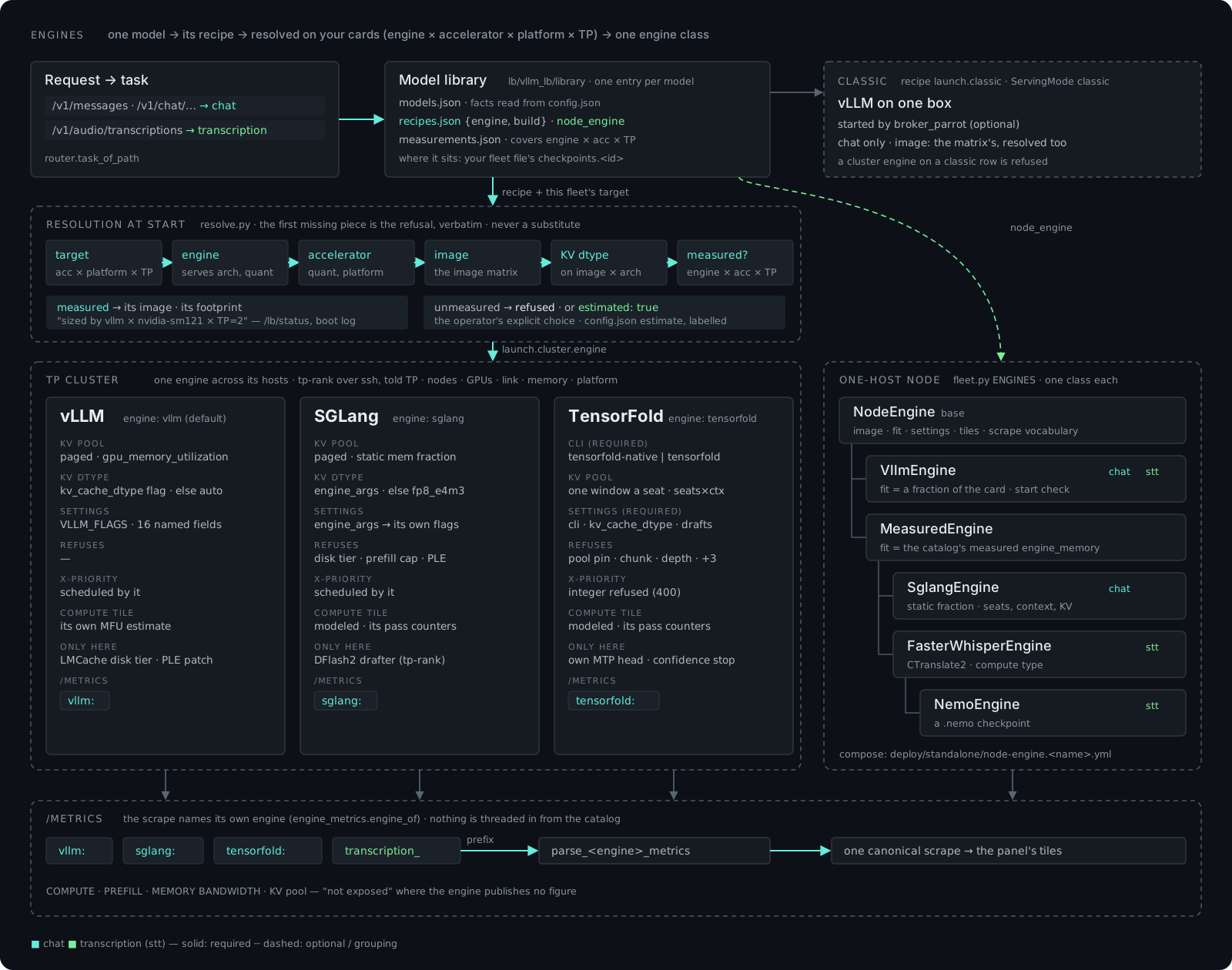
Resolution at Start walks those axes in order — the target exists, the engine serves the model’s architecture and quantisation, the accelerator runs it, an image exists for engine × build × accelerator × platform, the KV dtype runs on that image, the combination was measured — and the first missing piece is the refusal, verbatim. No nearest accelerator, no default image. Why sm_121 and sm_120 are two keys and not one is a good example of why: arch-specific cubins compiled for a GB10 only run on that exact compute capability, so one key would hand an RTX 5090 an image it cannot load.
Bring your own hardware
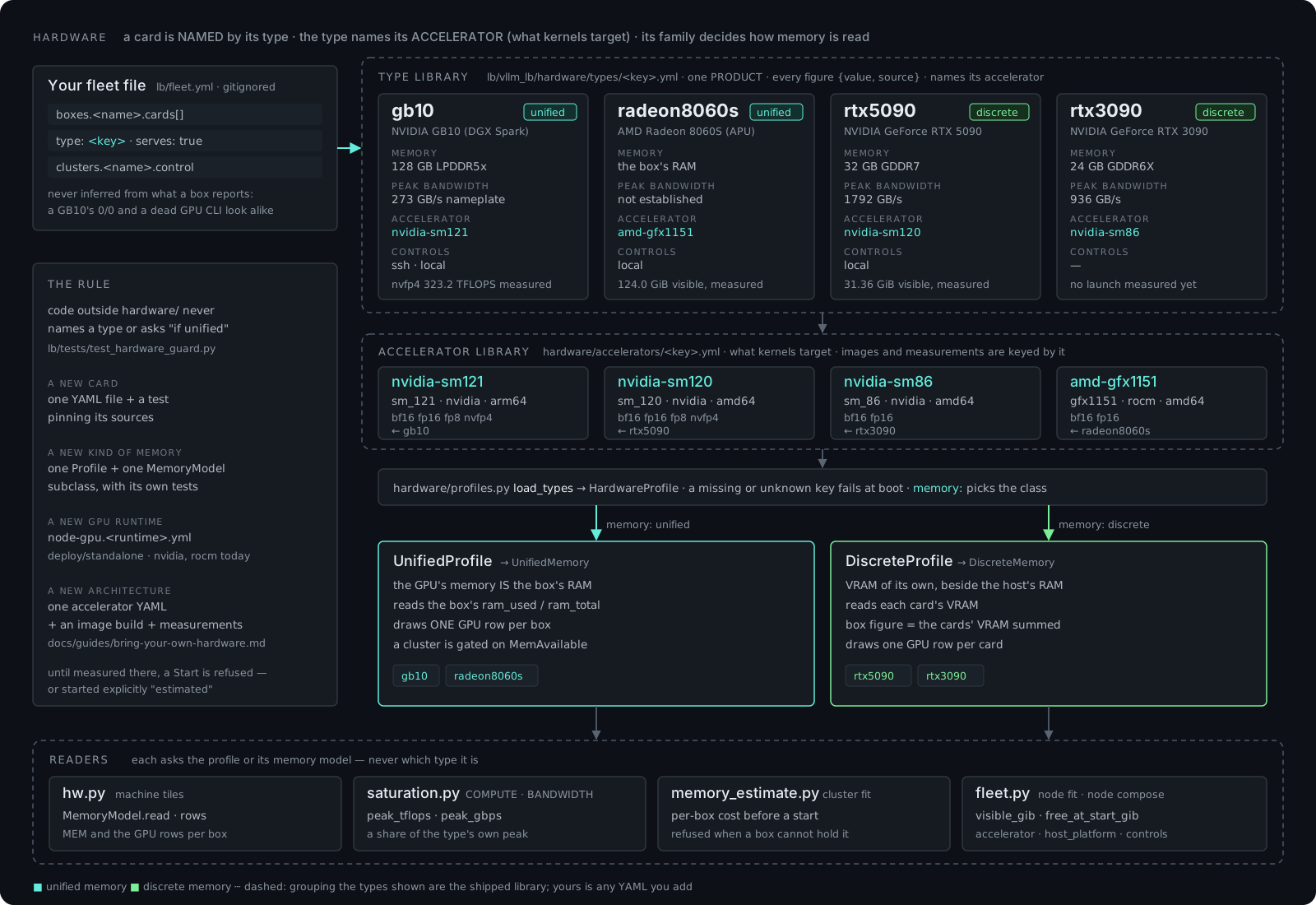
Four accelerators ship today — nvidia-sm121 (GB10 / DGX Spark), nvidia-sm120 (RTX 5090), nvidia-sm86 (RTX 3090) and amd-gfx1151 (Radeon 8060S) — with a card-type file each. Adding yours is data, not a branch in the code:
| You have | You add |
|---|---|
| a new card of a known architecture | one hardware/types/<key>.yml naming its accelerator |
| a new architecture | an accelerator YAML, an image build, and measurements |
| a new engine | an engine YAML, its behaviour class, its image matrix |
| a new model | a models.json row (read by model_facts), a recipe, a measurement |
| a new deployment | lb/fleet.yml from lb/fleet.example.yml |
# lb/vllm_lb/hardware/types/<key>.yml — every figure {value, source}; null + why where no source states it
name: <product name>
memory: discrete            # or unified: the behaviour family
accelerator: nvidia-sm120   # what its kernels target
controls: [local]
facts:
  memory_gb: {value: 32, source: "<spec page>"}
  peak_gbps: {value: …, source: "…"}
  visible_gib: {value: null, source: "not measured: …"}
Hardware behaviour is a class per memory family — unified (a GB10, an APU) versus discrete (a PCIe card) — and that family decides how memory is read and drawn. Code outside the hardware package never names a card type.
Hardware telemetry and a flight recorder
The hardware tiles show memory, bandwidth, compute and KV pool per box, modeled from the engine’s own counters where it exposes them — and labelled “not exposed” where it doesn’t, rather than guessed. GPU cards are drawn with the fan turning at the GPU’s utilisation and VRAM chips lit by used/total.
Under each box’s card opens its flight recorder: the last hour of power, temperatures, clocks, CPU, network, throttle state and the containers it runs, sent by a stdlib-only telemetry sender on the box (nvidia-smi, amdgpu sysfs, /proc, thermal zones, cgroup v2).
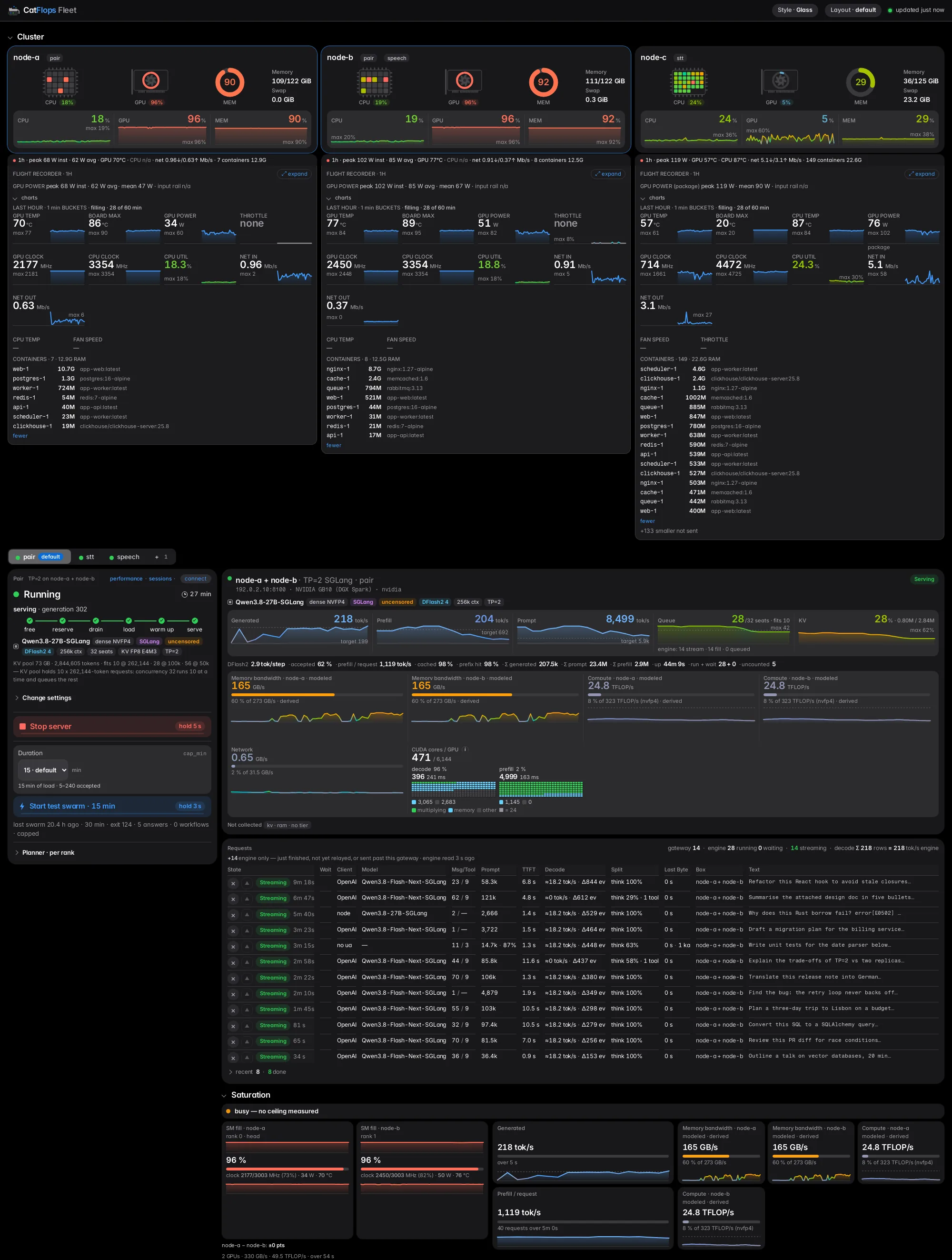
The panel layout is yours: templates (default, compact, wall, column), an edit mode with drag and keyboard arrows, export/import as JSON — kept in the browser’s localStorage, never on the server.
The look is switchable too: five panel styles (Vibe coded, Clean, Mono, Glass, Terminal). Glass, shown above, is the shipped default; the fleet file sets the deployment’s default (panel: {style: glass}) and each browser can pick its own.
Hand it to a coding agent
The repo is set up to be operated by Claude Code, Cursor or Codex. Every service is one image with a hermetic test suite, every deployment value lives in a .env.example or a fleet.example.yml, and publishability guards fail the suite the moment a host name or an address is compiled into code, compose, tests or fixtures.
The agent doesn’t set the fleet up from a guess. SETUP.md is a wizard: a library of 191 questions in 24 sections — machines, cards, engines, models, clusters, exposure, the sign-in in front — each with the exact file and key it writes. The agent asks every one before writing a single file, shows you the whole answer sheet (secrets masked), waits for your yes, then renders the config deterministically with deploy/setup/render.py. Probes like nvidia-smi may propose an answer; a proposal is never an answer until you confirm it, because silently written auto-detection is just another fallback. A coverage test fails when a new setting has no question.
Reference setups (“blueprints”) ship for two proven shapes — two DGX Spark (GB10) boxes at TP=2, and one RTX 5090 — each citing the measurement it is sized by. The wizard offers the ones that fit your answered hardware as a prefill; what lands in your fleet file is plain settings.
Set up catflops_fleet (https://github.com/robertziel/catflops_fleet) for me.
Read SETUP.md and run its wizard: ask me every question it lists before writing
any file, show me the answer sheet, and wait for my yes.
Security model
Read this before exposing anything:
- No authentication is implemented. Anyone who can reach the gateway, its panel or usage-mcp can send requests, start or stop models and kill requests. Everything binds
127.0.0.1for that reason — put your own authenticating reverse proxy in front before any other machine can reach it. None ships. - Host allowlist against DNS rebinding. Binding loopback doesn’t keep a browser out: a page elsewhere can rebind its own name to
127.0.0.1. So every request’sHostmust be a loopback name at the listener’s port or one in the requiredLB_ALLOWED_HOSTS— anything else is a 421 — and a write whoseOriginisn’t such a name is a 403. The power panel applies the same rule. - Writes are JSON-only. Anything other than
application/jsonis a 415, so a cross-site page can’t fire one as a simple request. - The power panel can power machines off, so it is dry-run by default, answers only requests carrying the front proxy’s shared secret, and acts only on the boxes listed for it.
- Nothing ships a credential, a key or a default secret; a missing one stops the service by name.
broker_parrot is opt-in
broker_parrot is a separate job-fleet engine. It is off by default: no checkout, no Postgres, no external network. Turn it on (LB_BROKER_ENABLED=1 plus a compose override) and the gateway leases a box’s server through the broker’s queue instead of dialling it directly, so GPU boxes shared with other work are never fought over — and a cluster Start reserves both boxes through the broker first. Off is an explicit choice, not a fallback: a gateway with the broker on and the broker down says so and refuses to route unleased.
broker_parrot’s fleet-management features are gradually moving into catflops_fleet.
Quickstart
Docker with Compose v2 and at least one vLLM or SGLang server reachable over HTTP. No GPU is needed where the gateway runs.
git clone https://github.com/robertziel/catflops_fleet && cd catflops_fleet
cp lb/.env.example lb/.env && chmod 600 lb/.env
#   in lb/.env: SEARXNG_SECRET=<openssl rand -hex 32>, LB_ALLOWED_HOSTS=loopback
cp lb/fleet.example.yml lb/fleet.yml        # your boxes, their cards, the cluster
cd lb && docker compose up -d --build --wait
curl -s http://127.0.0.1:8010/lb/status | head -c 400
The gateway page is http://127.0.0.1:8010/. Every knob is listed with its default in lb/.env.example; next to the pair’s fleet.example.yml sit a one-host shape, a parallel shape (two clusters under one gateway) and an AMD-APU-node shape.
Licence
Apache-2.0 — use it, modify it and ship it, commercially or not; keep the licence and copyright notice. Third-party parts keep their own terms (NOTICE).
Code, the engines × accelerators design doc, the bring-your-own-hardware guide and the setup wizard are on GitHub. Bug reports, hardware types and engine adapters are welcome.